Pixalate identifies 3,277 impersonated app IDs and daily device-ID churn anchored to residential IPs across six CTV platforms.
Executive Summary: Pixalate today disclosed Mayfly, a sophisticated Connected TV (CTV) ad fraud scheme that sells ad impressions from TVs that do not appear to exist.
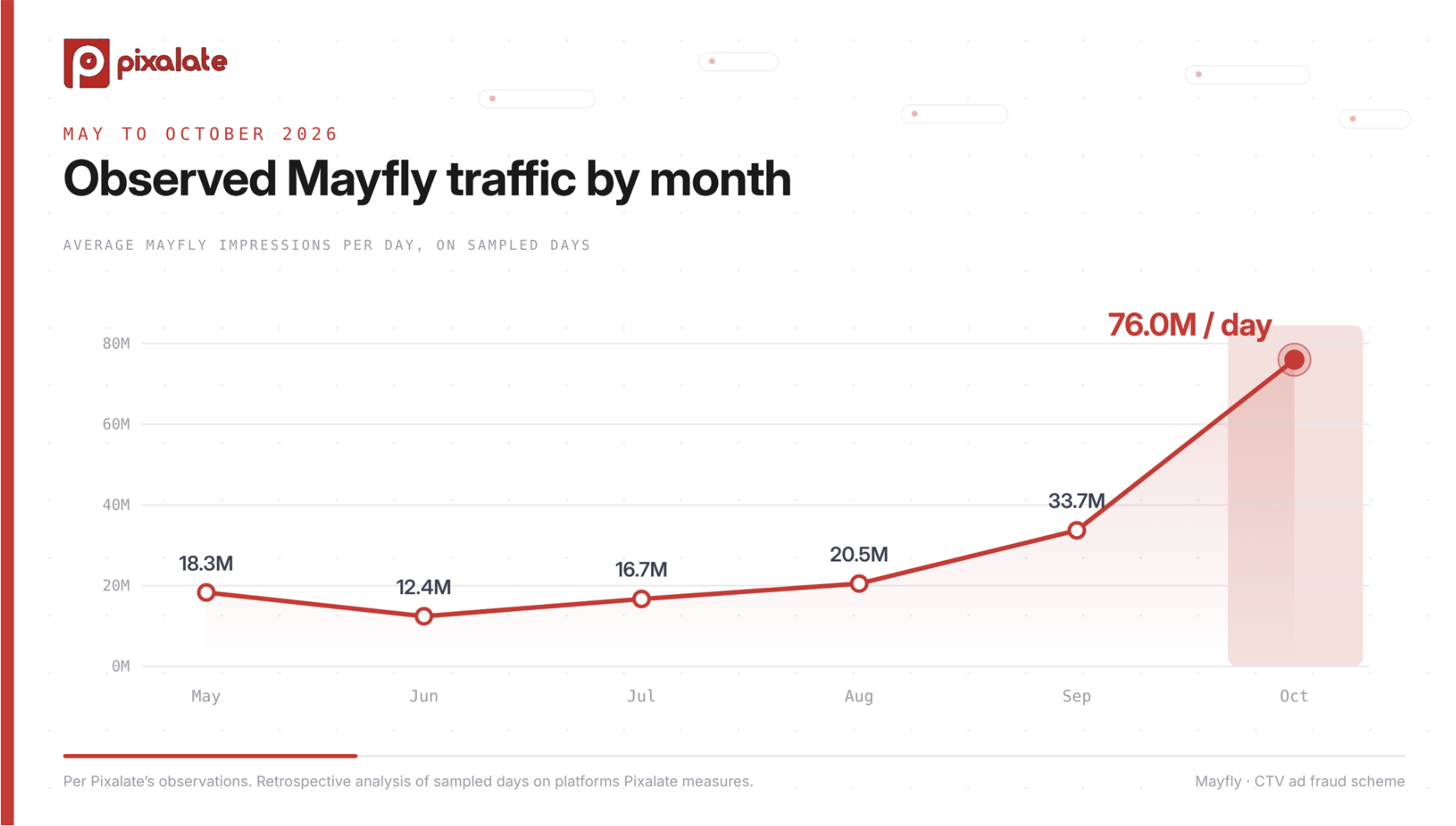
- Between May and October 2026, Pixalate estimated Mayfly traffic averaged more than 900 million ad impressions a month
- Cost advertisers an estimated $135 million over six months (based on $25 CPM); reached an estimated $1.9 million per day in October
- Predominantly a US-focused ad fraud scheme
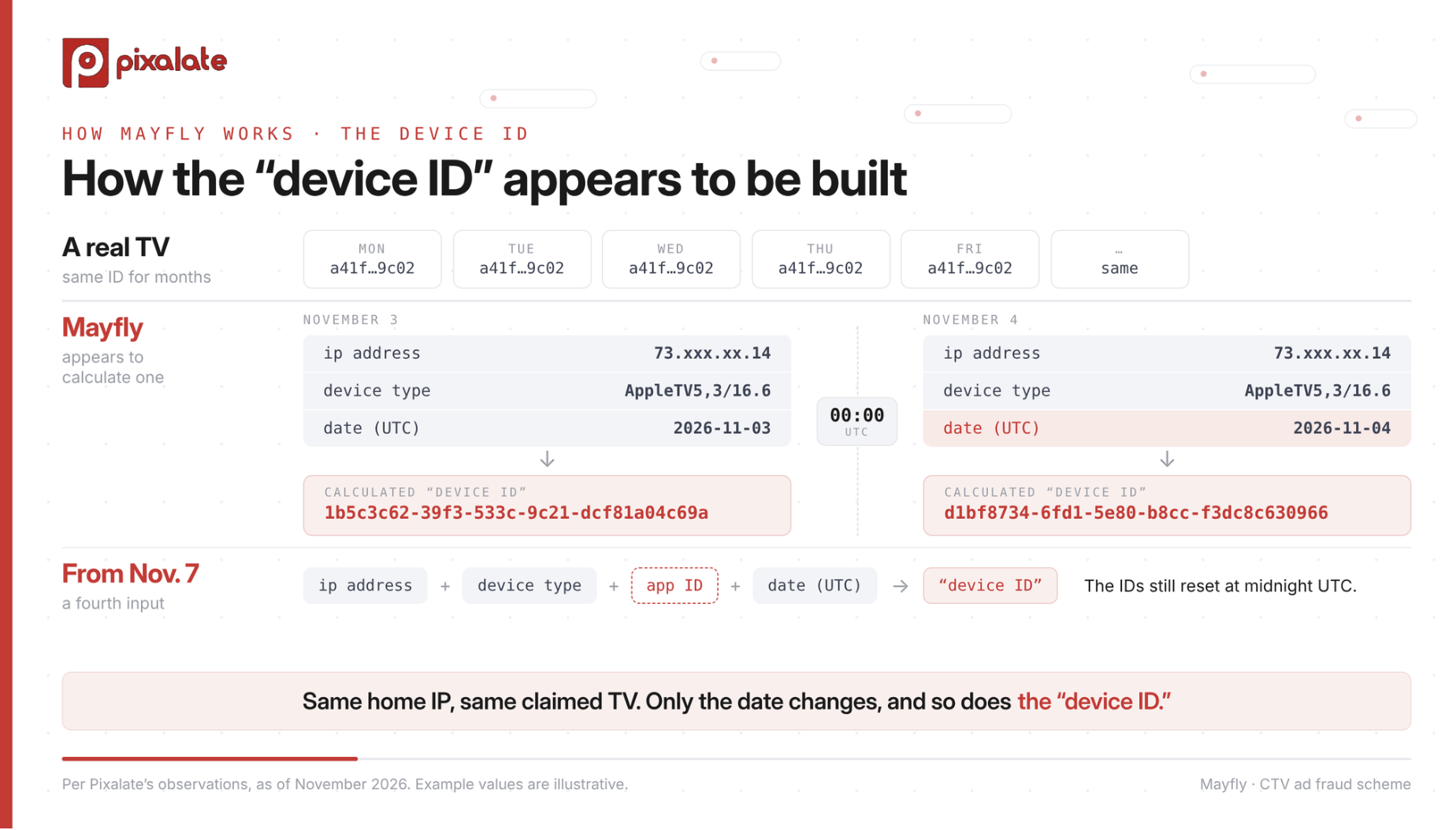
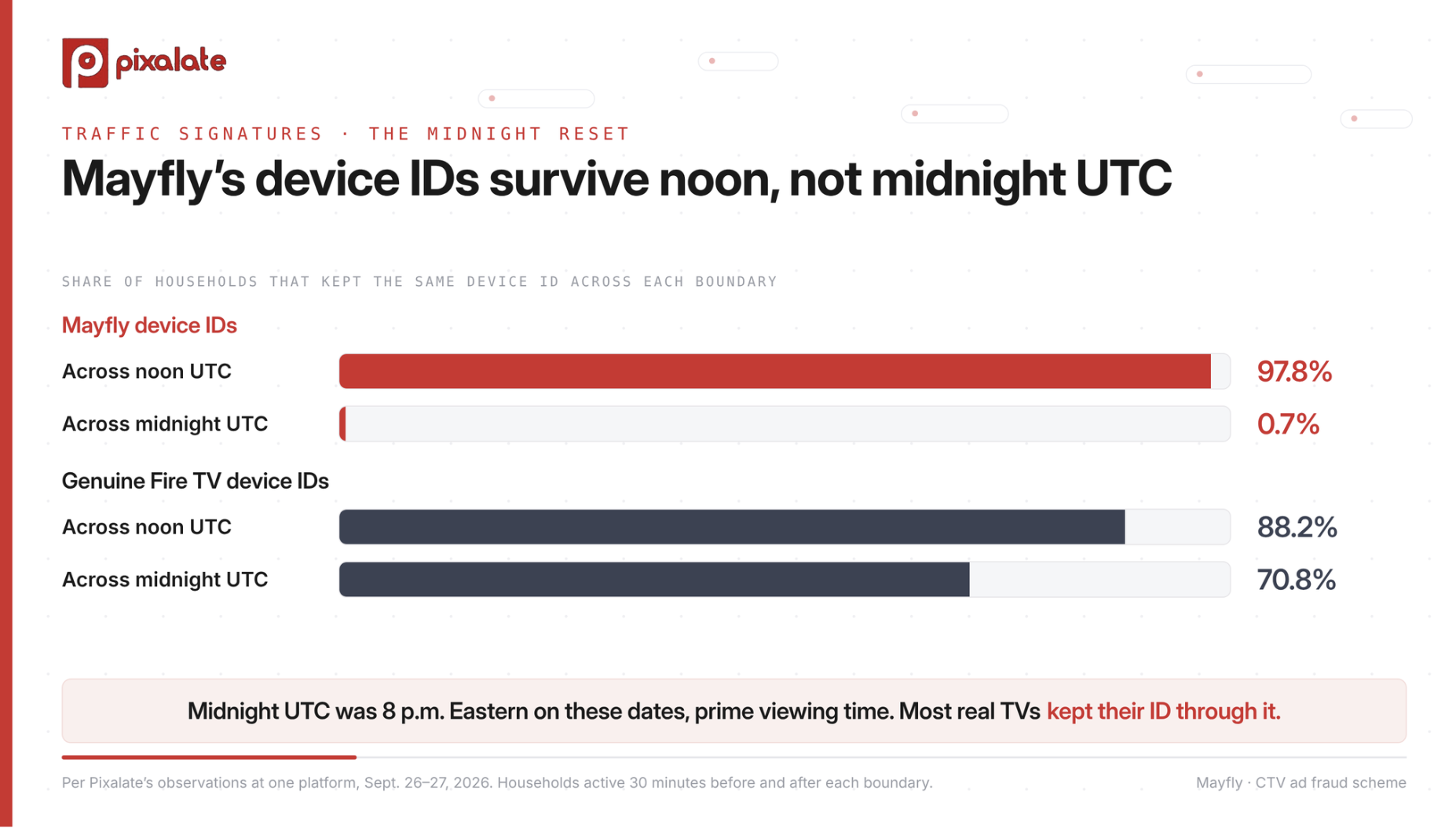
- Device IDs appear to be generated new each day and discarded at midnight UTC
- Impersonated 3,277 apps across Roku, Apple TV, Samsung TV, Amazon Fire TV, Android TV, and LG TV apps
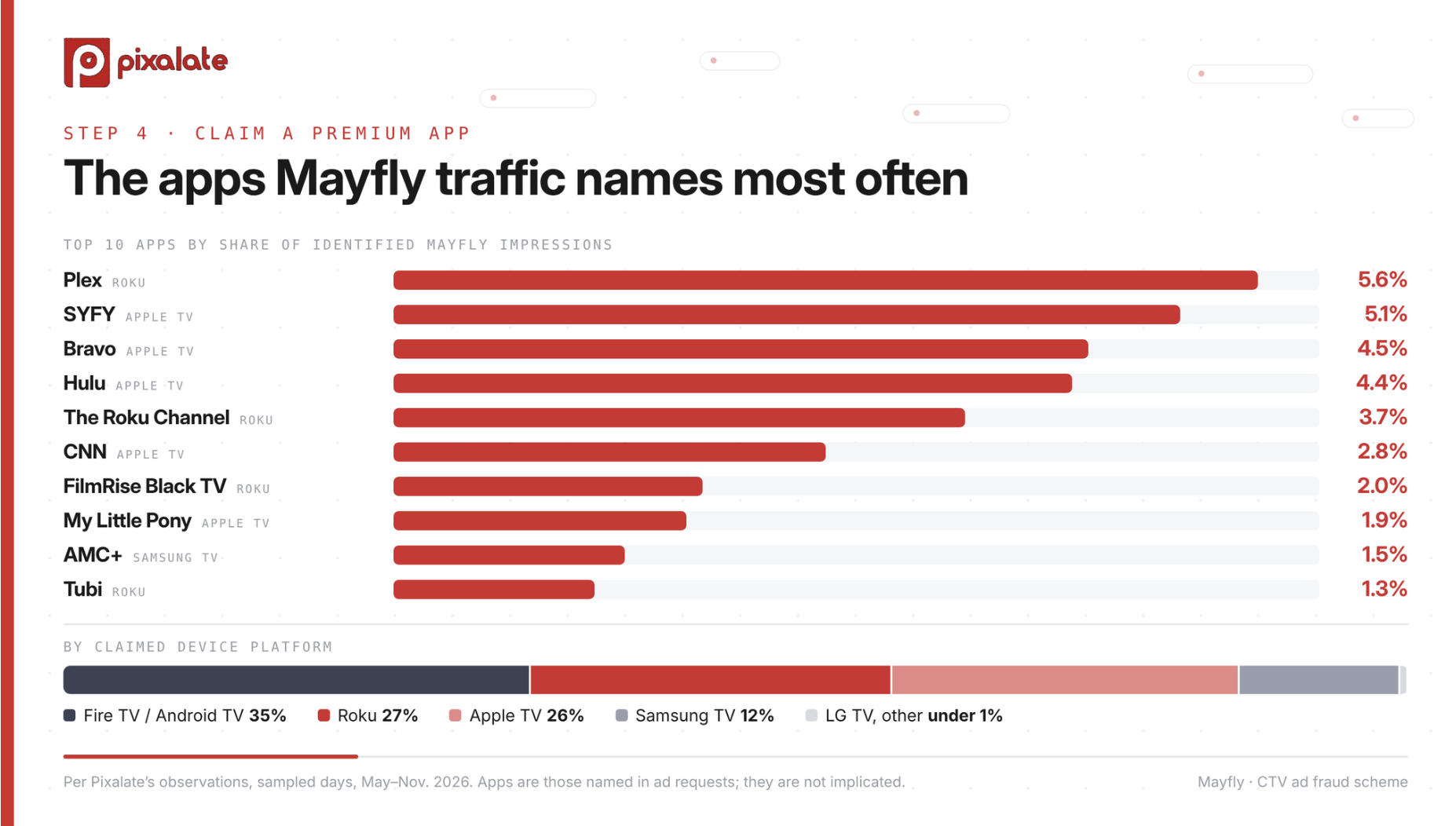
- Targeted premium streaming TV apps such as Plex, SYFY, Bravo, Hulu, The Roku Channel, CNN, FilmRise Black TV, My Little Pony, AMC+, and Tubi
- 77% of Mayfly impressions were sold by a seller not listed in the app’s app-ads.txt file (among impressions with supply chain information)
- 23% of Mayfly impressions came from seller accounts missing from their own exchange’s sellers.json file (among impressions with supply chain information)
Mayfly Scheme Metrics
Per Pixalate’s observations, as of November 2026:
| Metric |
Value |
| Flagged impressions, sampled days (extrapolated to 6 months) |
5.46 billion |
| Estimated ad spend (at $25 CPM) May-Oct. 2026 |
~$135 million |
| Average flagged per day (October 2026) |
76 million |
| Apps impersonated |
3,277 |
| Top 20 most impersonated apps (by flagged impressions, in order) |
Plex (Roku), SYFY (Apple TV), Bravo (Apple TV), Hulu (Apple TV), The Roku Channel (Roku), CNN (Apple TV), FilmRise Black TV (Roku), My Little Pony (Apple TV), AMC+ (Samsung TV), Tubi (Roku), ESPN (Fire TV), discovery+ (Roku), Sling TV (Samsung TV), HGTV GO (Android TV/Fire TV), ViX (Samsung TV), Plex (Android TV/Fire TV), Xumo Play (Android TV/Fire TV), Philo (Android TV/Fire TV), Fubo (Android TV/Fire TV), ESPN (Apple TV) |
| Flagged impressions from home and business broadband IPs |
99.7% |
How Mayfly Works
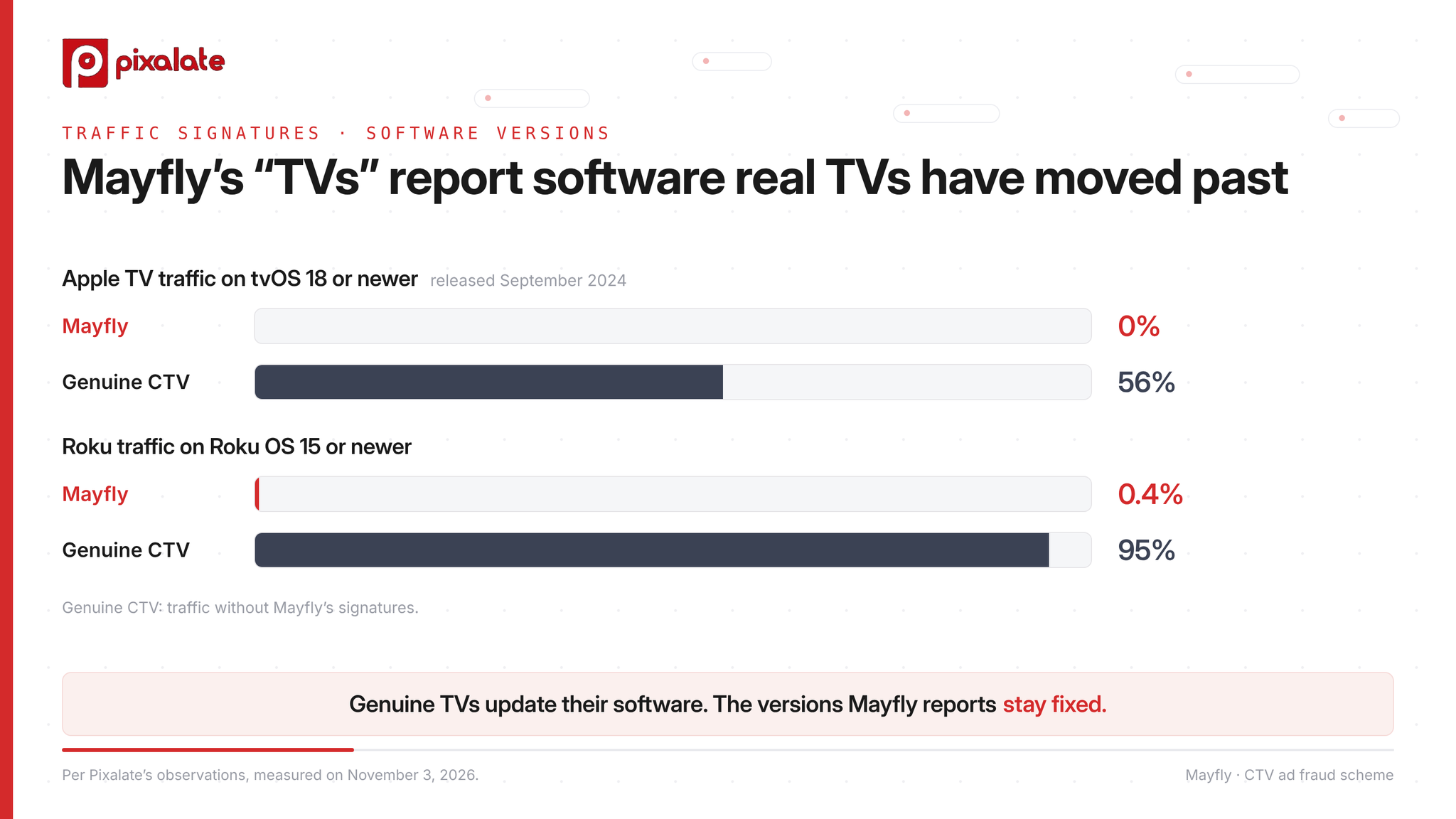
- Fake the device: Every ad request has to say what kind of TV it came from. Mayfly appears to have no TV, so it picks one from an apparent fixed list. For example, on Apple TV, the same 35 device types appeared in May and in November 2026, and none runs tvOS 18 (released September 2024) or newer.
- Generate the device ID: A real TV keeps the same device ID unless the user resets it from the device. Mayfly appears to calculate its “device ID” from three things: the IP address, the device’s user-agent string, and the date. For example, one device ID observed on November 3, 2026 was faf3ee89-e328-5c1c-9887-2a2f6672ec0b. On November 7, 2026, the method changed across multiple seller accounts at once: the app bundle, as sent in the ad request, became a fourth input. The IDs still reset at midnight UTC.
- Attach a real home IP address: The request carries an IP address that appears to belong to a real home on an ordinary broadband provider. To a buyer, it appears to come from a household rather than a data center.
- Claim a premium app: Every ad request also names the app the ad will run in, and Mayfly appears to name from a list of streaming apps, including Hulu, ESPN, CNN, Peacock, Tubi, Pluto TV, and more. Pixalate observed a total of 3,277 apps named in Mayfly traffic, across Roku, Apple TV, Samsung TV, Amazon Fire TV, Android TV, and LG TV.
- Sell it through resellers: The request appears to enter the market through seller accounts at smaller ad exchanges. It is resold, sometimes several times, until an advertiser buys it.
- Discard the ‘burner TV’ & start over at midnight: Because the date is part of the manufactured device ID, every ID expires at midnight UTC. The next day, per Pixalate’s observations, most (60%+) of the same home IP addresses are back, each loaded with a fresh batch of “burner TVs” (new device IDs on the same home IP addresses).
Traffic Signatures: Mayfly vs. Genuine CTV
Per Pixalate’s observations, Mayfly traffic can look premium at a glance, but a closer look reveals significant differences:
| Signal |
Mayfly |
Genuine CTV Traffic |
| Device IDs that come back the next day |
0% |
60% |
| Apple TVs running tvOS 18 or newer |
0% |
56% |
| Apple TV device types in use |
35, unchanged for 160 days |
No fixed list |
| Apple TV user agent |
Model and OS version only, e.g. AppleTV11,1/16.4.1 |
Typically also names the app or player, e.g. AppName/5.0 (tvOS 18.4.1; AppleTV11,1; Apple TV) |
| Roku devices running Roku OS 15 or newer |
0.4% |
95% |
| New “TVs” per IP each day |
~6 |
~0 (the same TVs each day) |
| App rotation |
A new app in as little as 4 seconds |
One app at a time |
Genuine CTV traffic: traffic without Mayfly’s signatures. Measured on sampled days, May to November 2026; platforms vary by row.
Pixalate identifies Mayfly by home IP addresses whose device IDs turn over completely from one day to the next. The other signals are what indicate the “TVs” are apparently fake: the device types come from an apparent fixed list, and their software versions have not changed in months. These also do not appear to be ordinary session IDs, which would not explain the outdated software, and the ID method changed on the same day across multiple seller accounts.
Supply Chain Entry Points
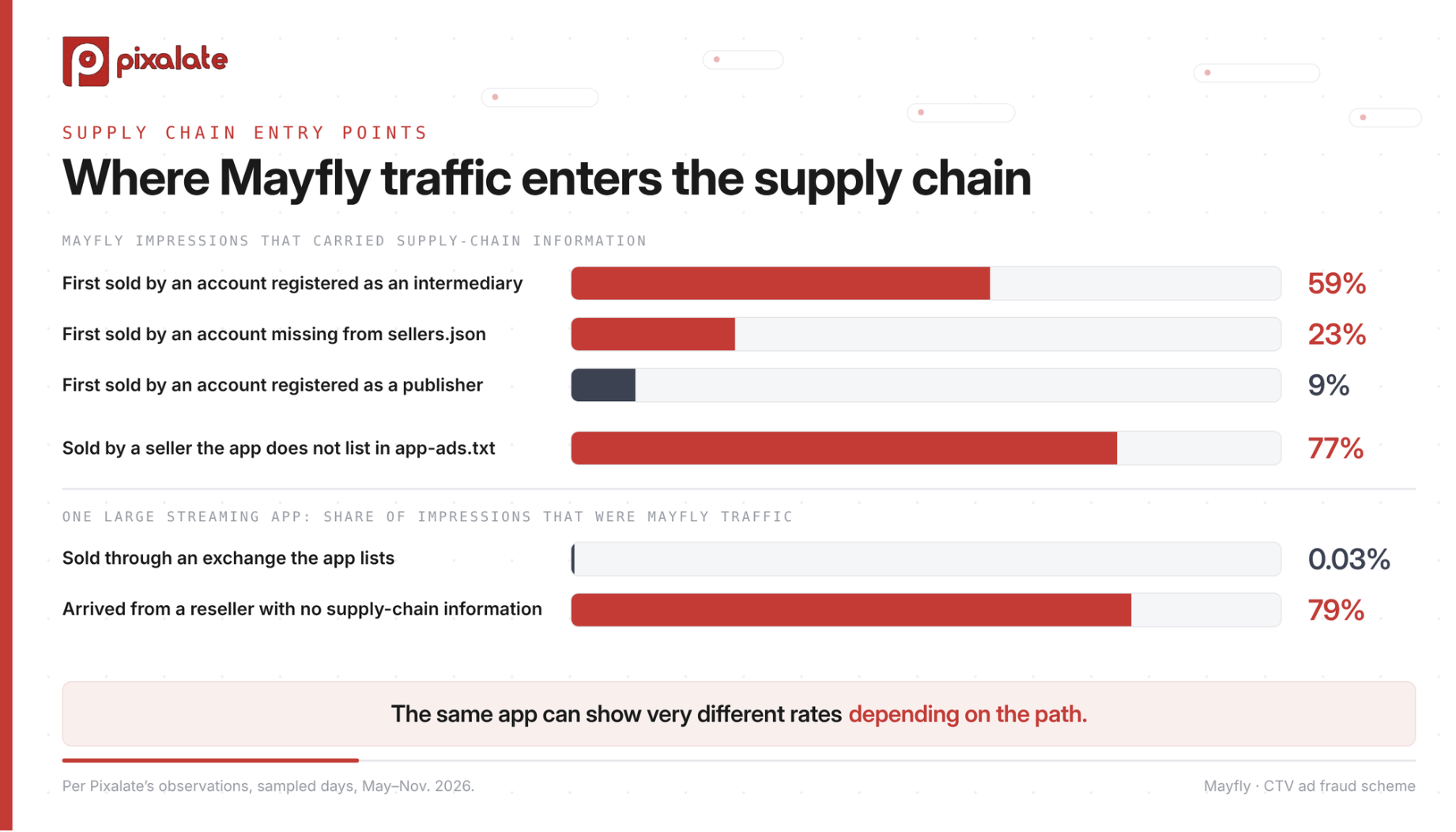
Per Pixalate’s observations, Mayfly traffic appears to enter the market through resellers, often on paths where the seller is not disclosed or is not listed by the app.
- It comes in through resellers, not publishers. Among Mayfly impressions that carried supply-chain information, 59% were first sold by an account registered as an intermediary, and only 9% by a publisher.
- Some sellers are not disclosed at all. Another 23% came from seller accounts missing from their own exchange’s sellers.json file.
- The app usually does not list the seller. Of the same impressions, 77% were sold by a seller that is not listed in the app’s app-ads.txt file.
- The same app can show very different rates depending on the path. For one large streaming app, 0.03% of impressions sold through an exchange the app lists were Mayfly traffic. Among impressions that arrived from a reseller with no supply-chain information, 79% were.
Mitigation for CTV Advertisers, Agencies, and DSPs
- Block by IP before the bid. Per Pixalate’s observations, the device IDs change every night, but most of the home IP addresses do not. Consider blocking affected IP addresses, paired with post-bid analytics. (Some of the affected IPs may also be used by genuine household devices; continuous monitoring is recommended.)
- Audit campaigns with perfect reach. A CTV campaign that reports new devices every day, with none seen twice, warrants a closer look.
- Buy through sellers the app lists. Check the app’s app-ads.txt and require full supply chain information. These controls reduce exposure but should be paired with device- and IP-level detection.
Customers using Pixalate's products are protected from Mayfly.
Validation
Pixalate validated the detection through user acceptance testing and by comparing it against platforms with known-clean CTV traffic, where flag rates stayed at baseline and genuine device IDs persisted from day to day.
Indicators of Compromise (as of November 2026)
Fraud and traffic quality teams can compare their own CTV traffic against the patterns below. Mayfly’s methods appear to change over time, so this list reflects what Pixalate observed through November 2026.
- Apparent device ID formula, before November 7, 2026: UUID version 5 of IP address + device type (user agent) + UTC date.
- Apparent device ID formula, from November 7, 2026: a version 5 UUID that appears to be derived from the IP address, device type (user agent), app bundle ID (as sent in the ad request), and UTC date.
- Device ID lifespan: one UTC day.
- Example device IDs (observed November 3, 2026): faf3ee89-e328-5c1c-9887-2a2f6672ec0b, a1e34938-ab52-5436-96ce-56e69aa01b02, 33dfa2b7-d959-5cda-be35-6516b3dc3244, 13e3528f-2eb9-5637-88fe-ee6d911d4574, 37cd4923-384c-56f7-9cd4-c99a6a0e25fc.
- Roku OS pattern (observed at some platforms): Roku OS 12.0, 13.0, or 14.0. On versions 13.0 and 14.0, the code after the dash equals the last 3 digits of the build number plus one, in hexadecimal.
Apple TV device descriptions (35): written as model/version, for example AppleTV5,3/16.6. The two tvOS 14.3 entries are written as “AppleTV5,3: tvOS/14.3” and “AppleTV6,2: tvOS/14.3”.
| Model |
tvOS versions |
| AppleTV5,3 |
13.3, 13.3.1, 13.4, 13.4.6, 14.2, 14.3, 15.0, 15.2, 16.0, 16.1, 16.4.1, 16.5, 16.6, 17.0, 17.1, 17.1.1 |
| AppleTV6,2 |
14.3, 16.4.1, 16.5, 16.6, 17.0, 17.1, 17.1.1 |
| AppleTV11,1 |
16.4.1, 16.5, 16.6, 17.0, 17.1, 17.1.1 |
| AppleTV14,1 |
16.4.1, 16.5, 16.6, 17.0, 17.1, 17.1.1 |
Disclaimer
The content of this blog posting reflects Pixalate’s opinions with respect to, among other things: (i) its apparent discovery of an OTT/CTV ad fraud scheme; (ii) the elements of any such purported scheme(s); (iii) parties, brands, platforms, and apps that may have benefitted from, participated in, or been exploited or victimized by such alleged scheme(s); and (iv) other factors, information, and observations that Pixalate believes may be useful to the digital media industry. Any proprietary data shared is grounded in Pixalate’s proprietary technology and analytics, which Pixalate is continuously evaluating and updating. Any references to outside sources should not be construed as endorsements. Pixalate’s opinions are just that, opinions, which means that they are neither facts nor guarantees.
Per the MRC, “'Fraud' is not intended to represent fraud as defined in various laws, statutes and ordinances or as conventionally used in U.S. Court or other legal proceedings, but rather a custom definition strictly for advertising measurement purposes.” Also per the MRC, “‘Invalid Traffic’ is defined generally as traffic that does not meet certain ad serving quality or completeness criteria, or otherwise does not represent legitimate ad traffic that should be included in measurement counts. Among the reasons why ad traffic may be deemed invalid is it is a result of non-human traffic (spiders, bots, etc.), or activity designed to produce fraudulent traffic.”
It is important to also note that Pixalate’s references to the possible role(s) of certain parties, brands, platforms and apps in connection with this apparent scheme are not intended to assert or imply, conclusively or otherwise, that such parties, brands, platforms, and apps were in any way beneficiaries of, participants in, or knowledgeable regarding this apparent scheme. Nor were such references intended to assert or assign culpability for any possible intentional or negligent conduct.
Finally, brands, logos, and trademarks specified in this blog posting and related media are utilized merely for referential purposes, and such brands, logos, and trademarks remain the property of their respective registrants and owners, as applicable.