-1.png?width=150&height=60&name=pixalate-full-logo%20(1)-1.png)
Overview
High Risk CTV Apps 2.0 Standard and Enterprise (Beta) are Connected TV app blocklists that identify known dangerous and fraudulent apps across 9 CTV operating systems — Android, FireOS, Linux, Roku, Samsung, Sony, tvOS (Apple TV), LG webOS, and Windows — and more than hundreds of CTV platforms. The lists combine high historical IVT rates, app store compliance signals, app-ads.txt compliance, and privacy risk indicators into a unified feed with transparent risk reason codes.
Apps are evaluated across multiple risk dimensions including IVT rates, app store compliance, developer transparency, and inventory quality signals. Apps are included on the list when app-level blocking is the appropriate control — meaning impression-level filtering cannot reliably isolate valid traffic from invalid traffic.
Each app on the list is tagged with one or more risk reason codes, providing transparency into the specific signals that triggered inclusion.
Risk Types
|
Risk Type |
Code |
Description |
|
High GIVT |
|
Apps with General Invalid Traffic rates exceeding Pixalate's threshold |
|
High SIVT |
|
Apps with Sophisticated Invalid Traffic rates exceeding Pixalate's threshold |
|
Missing Privacy Policy |
|
Apps missing privacy policies |
|
Abandoned App |
|
Apps that have not been updated by developers and may be unmaintained, insecure, or non-compliant with current app store requirements |
|
Missing app-ads.txt |
|
Apps generating ad impressions without a valid app-ads.txt file, indicating unauthorized inventory |
|
VPC Bypass |
|
Child-directed apps transmitting personal data without Verifiable Parental Consent, creating COPPA compliance exposure |
|
Developer Anonymity |
|
Apps where the developer has missing or unverifiable contact information |
|
Delisted App |
|
Apps removed from app stores that continue to generate ad traffic |
|
Made for Advertising |
|
Apps designed primarily to generate ad impressions rather than deliver genuine user value, including apps exhibiting ad stacking and other manipulative ad placement tactics |
NOTE: RiskType coverage differs across CTV operating systems based on each platform’s level of transparency and metadata availability.
File Format and Delivery
|
Attribute |
Value |
|
File Format |
CSV |
|
Delivery Method |
FTP or S3 Bucket |
|
Naming Convention |
CtvHighRiskApps_YYYYMMDD |
|
Update Frequency |
Daily |
Schema
High Risk CTV Apps 2.0 Standard and Enterprise (Beta) evaluate each app against nine risk dimensions. An app can be flagged for multiple risk types simultaneously — for example, an app may be both abandoned and missing a privacy policy.
The probability field is set to 1 for all entries. High Risk CTV Apps 2.0 (Beta) uses deterministic inclusion criteria — an app either meets the threshold for a risk type or it does not.
High Risk CTV Apps 2.0 Standard (Beta)
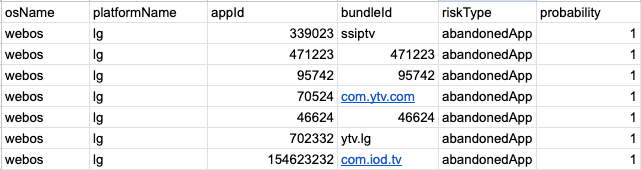
In High Risk CTV Apps 2.0 Standard (Beta), when an app has multiple risk types, the riskType field displays the string value “various”.
|
Column |
Type |
Description |
|
osName |
STRING |
The Operating System (OS) name that is associated with a given app. |
|
platformName |
STRING |
The platform where the CTV app is available |
|
appId |
STRING |
The actual ID that characterizes a CTV app, if available |
|
bundleId |
STRING |
The bundle ID associated with the app |
|
riskType |
STRING |
Risk type code; displays the string value “various” when multiple risk types apply |
|
probability |
FLOAT |
Value of 1.0 for all entries |
Example:
High Risk CTV Apps 2.0 Enterprise (Beta)
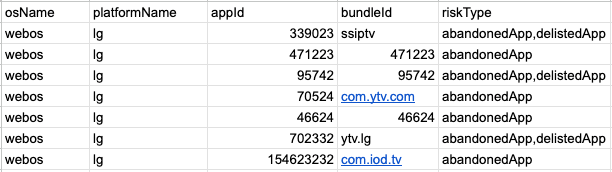
High Risk CTV Apps 2.0 Enterprise (Beta) provides full granularity by listing all applicable risk types as comma-separated values (e.g., highSivt,abandonedApp,missingPrivacyPolicy) instead of displaying various. This enables you to build custom blocking logic based on specific risk type combinations.
|
Column |
Type |
Description |
|
osName |
STRING |
The Operating System (OS) name that is associated with a given app. |
|
platformName |
STRING |
The platform where the CTV app is available |
|
appId |
STRING |
The actual ID that characterizes a CTV app, if available |
|
bundleId |
STRING |
The bundle ID associated with the app |
|
riskType |
STRING |
Comma-separated list of all applicable risk types |
Example:
Contact your Customer Success representative to upgrade to High Risk CTV Apps 2.0 Enterprise (Beta).
Note: Access to High Risk CTV Apps 2.0 Standard (Beta) requires acceptance of an updated Master Service Terms (MST). Access to the Enterprise(Beta) version requires an upgrade to your subscription. Contact your Customer Success representative for details.
Integration Recommendations
Pre-bid blocking: When blocking apps from this list, use bundleId + osName at minimum to ensure you block the correct app. When an app also has an appId available, use appId + bundleId + osName.
Risk-based filtering: Use the riskType field to implement selective blocking based on your risk tolerance. For example, you may choose to block only apps flagged for highSivt or mfaApp while permitting apps flagged solely for abandonedApp.
Frequently Asked Questions
How should I use the App ID, Bundle ID, and OS columns?
When blocking an app, use bundleId + osName at minimum. This prevents inadvertently blocking an app on a different operating system that shares the same identifier. For better precision, include appId as well.
Why do some apps appear on the list and then disappear?
Apps are evaluated using a rolling lookback window. If an app's risk indicators improve over time (e.g., IVT rates fall below thresholds), the app will age off the list for that particular risk type. However, an app that ages off may be re-added in the future if risk indicators resurface, or may be flagged for different risk types.
What is the difference between High Risk CTV Apps 2.0 Standard (Beta) and Enterprise (Beta)?
High Risk CTV Apps 2.0 Standard (Beta) maintains backward compatibility with existing integrations by showing a single risk type value (or various for multiple) and includes a probability field. High Risk CTV Apps 2.0 Enterprise (Beta) provides full granularity with comma-separated risk type codes and removes the probability field. Clients subscribed to the Enterprise version also gain access to the new High Risk App data points in scheduled reports via Analytics and the Analytics API.
What risk types are supported for each CTV operating system?
Risk type coverage differs across CTV operating systems based on each platform’s level of transparency and metadata availability. Expanded risk type coverage for additional CTV operating systems is planned for a future release.
How can an app be removed from the list?
Apps are automatically removed when they no longer meet the inclusion criteria for any risk type. For IVT-based risk types, this occurs when IVT rates fall below thresholds over the lookback period. For compliance-based risk types (e.g., missingPrivacyPolicy, abandonedApp), removal occurs when the app resolves the underlying issue.
How does this list relate to IVT reporting in Analytics?
Impressions from apps on this list are not automatically classified as IVT. The MRC's Invalid Traffic Detection and Filtration Interim Update Memo emphasize that IVT measurement should occur at the traffic level, distinct from app-level risk assessment. High Risk CTV Apps 2.0 (Beta) aligns with this guidance by separating app-level risk signals from impression-level IVT classification.
If an app is on this list, does that mean the app is flagged for IVT?
Not necessarily. Apps on the list may be present due to reasons that may or may not include IVT risk. There are a couple of risk types that are IVT-related (highGivt and highSivt) but High Risk CTV Apps 2.0 (Beta) also identifies apps that could present other types of risk (e.g., app store compliance, developer transparency, and inventory quality signals).
What data sources are used to compile this list?
Pixalate collects data from various sources to compile the list, including traffic data, third-party data, and app store metadata.
I work directly with a publisher on this list. What should I do?
The list provides app-level risk signals based on observed data across the ecosystem. If you have a direct relationship with a publisher and have visibility into their traffic quality, you may choose to use the risk type codes to make informed decisions about which risk types to block based on your risk tolerance and business requirements.